 JomLatih

Class booking
A class booking system for combat gyms
Members book on your own website with the pass they already hold. When a class is full they join the waitlist, and the first person waiting moves in when someone cancels.
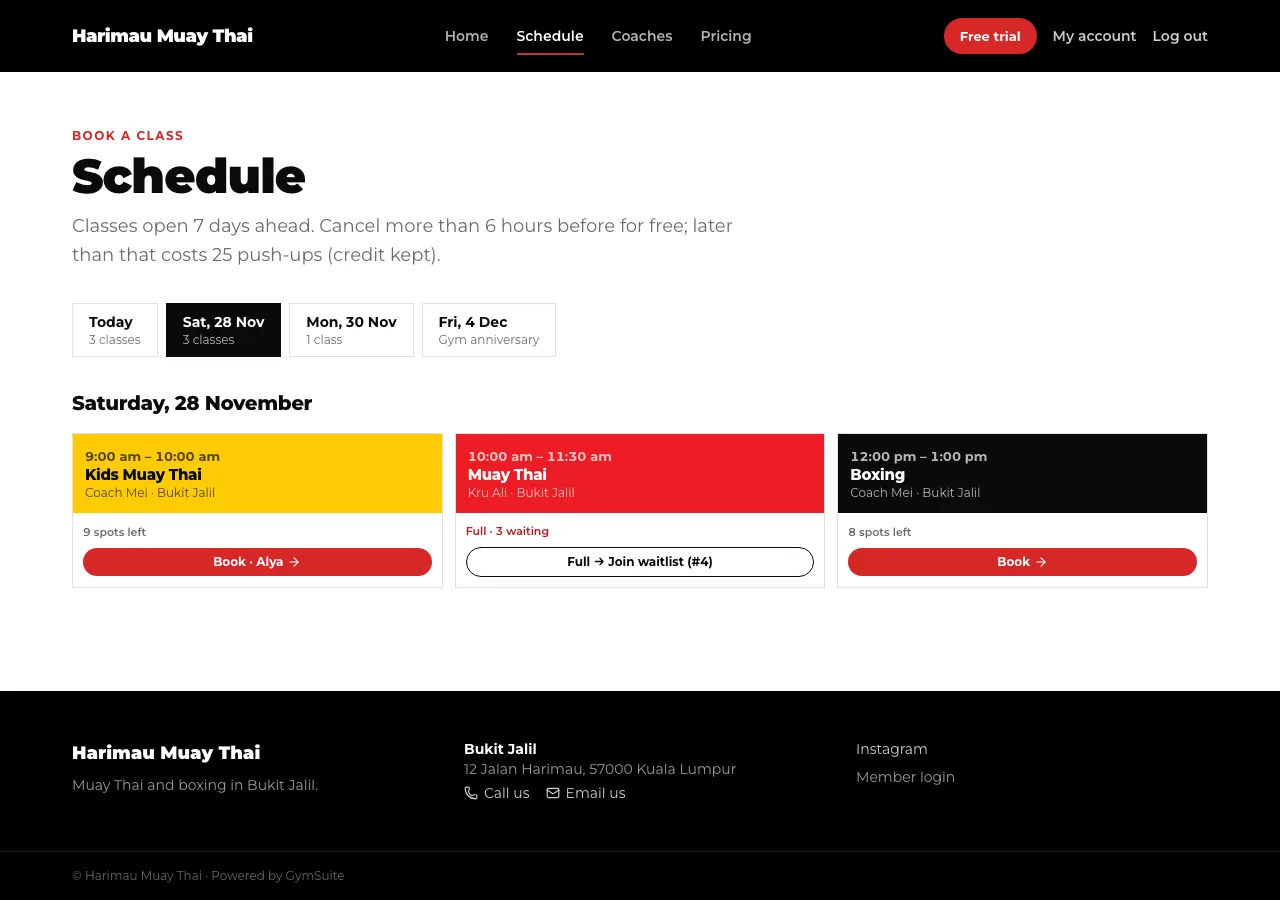
What the booking has to do
A combat gym timetable is not one kind of class. Muay Thai, boxing, no-gi, kids and open mat run side by side, each with its own coach and its own mat space. Every one of those is a class type with a slot on the week, a coach and a capacity.
Members see the week ahead on your site and book with their pass. The booking is what deducts the credit, so nobody has to cross a name off a list afterwards.
- Timetable with class types, coaches, outlets and a capacity for each class
- Book with a pass, a pack or a day pass; the credit comes off the member's account
- Join the waitlist when a class is full, and the first person waiting moves in on a cancellation
- You choose how many days ahead classes open and how many hours before class a member can cancel
The limits you set once
Capacity can be a default for the gym and a different number for a class where the mat is smaller. The booking window and the cancellation window are gym settings, not per-booking decisions, so the rule is the same for everyone.
If your gym uses push-ups for a late cancel or a no-show, that is a setting too. Set the number to zero and the penalty is off. The class credit still comes back on a late cancellation; the push-ups are the house rule on top.
Who does what on the day
The front desk works from today's roster: check people in, mark a no-show, add a walk-in who turned up without booking, and see who is still on the waitlist. Coaches see only the classes they teach, and staff can be limited to one outlet.
There are four roles: owner, manager, front desk and coach. Staff logins are unlimited on every plan, so a gym with six trainers does not pay six times.
Holidays and closed days
National public holidays are already in the calendar. For each one you decide whether the gym closes or whether only some classes run. Closing a day cancels its bookings and returns the credits, so a member is not left holding a class that never happened.
Selangor's state holidays are seeded. For another state, add the dates you close yourself.
What it does not do yet
This page describes what is live today. The list below is on the roadmap and is not sold as available, because a booking page that promises it would be wrong.
- Personal training booking with coach availability, and PT packs
- Member invoices and online payments into your gym's own account
- Belt and grade tracking
- Owner reports on attendance and revenue
- An embed widget for a website you already have
Plans from RM99 a month. The free trial is 30 days on Studio, no card. Every plan and limit.
Questions gym owners ask
More answers on the full FAQ.
Can members book without downloading an app?
Yes. They book in the browser on their phone and sign in with a one-time code sent to their email. There is no password and no app to install.
What happens when someone cancels a full class?
The first person on the waitlist moves into the class automatically. The roster shows who is booked, who is waiting and who has checked in.
Can I stop bookings too far ahead?
Yes. You choose how many days ahead a class opens for booking, and how many hours before the class a member can still cancel.
Can I run bookings at two outlets?
Yes. Pro includes two outlets, each with its own timetable, and a member books at either one from the same account.
Where to go next
Put your timetable online
Start a free trial, or book a demo and we will set it up with your own timetable.